TabLit recently released Trial Notebook ($69.99), an app aimed at making trial preparation easier and more organized for lawyers. The app is a great concept with a good start, but is still a bit rough around the edges and a bit of a learning curve as it took about 2 hours to become familiarized and comfortable working with the app.
Trial Notebook Concept
Any lawyer who has taken more than a few cases to trial is familiar with the concept of a trial notebook. Everything that matters gets placed into the three or two ring binder ‘notebook’ and neatly organized by tabs. Though each lawyer may have their own preferences, the basics in a civil case usually include tabs for: Case Info/Summary; To-Do List; Witnesses; Jury Selection; Jury Instruction; Damages; Exhibits; Pleadings/Orders; Opening; and, Closing.
Making the Trial Notebook Electronic – iPad
The iPad begs to be used as an electronic version of the trial notebook. Transitioning the trial notebook concept to the tablet platform makes perfect sense. TabLit’s approach takes the standard concept of a trial notebook and adds in the features which would be expected of an electronic version, including word search for the entire notebook. In each ‘tab,’ Trial Notebook allows creation of two main types of page: outline mode or checklist mode. In addition there are two other types of page: a ‘document’ based page and a ‘contacts’ based page. The contacts page will pull info from iOS Contacts. However, it is a bit unpolished in use because it doesn’t allow searching or sorting of iOS contacts, making it virtually impossible to locate the contact you want to add to your trial notebook.


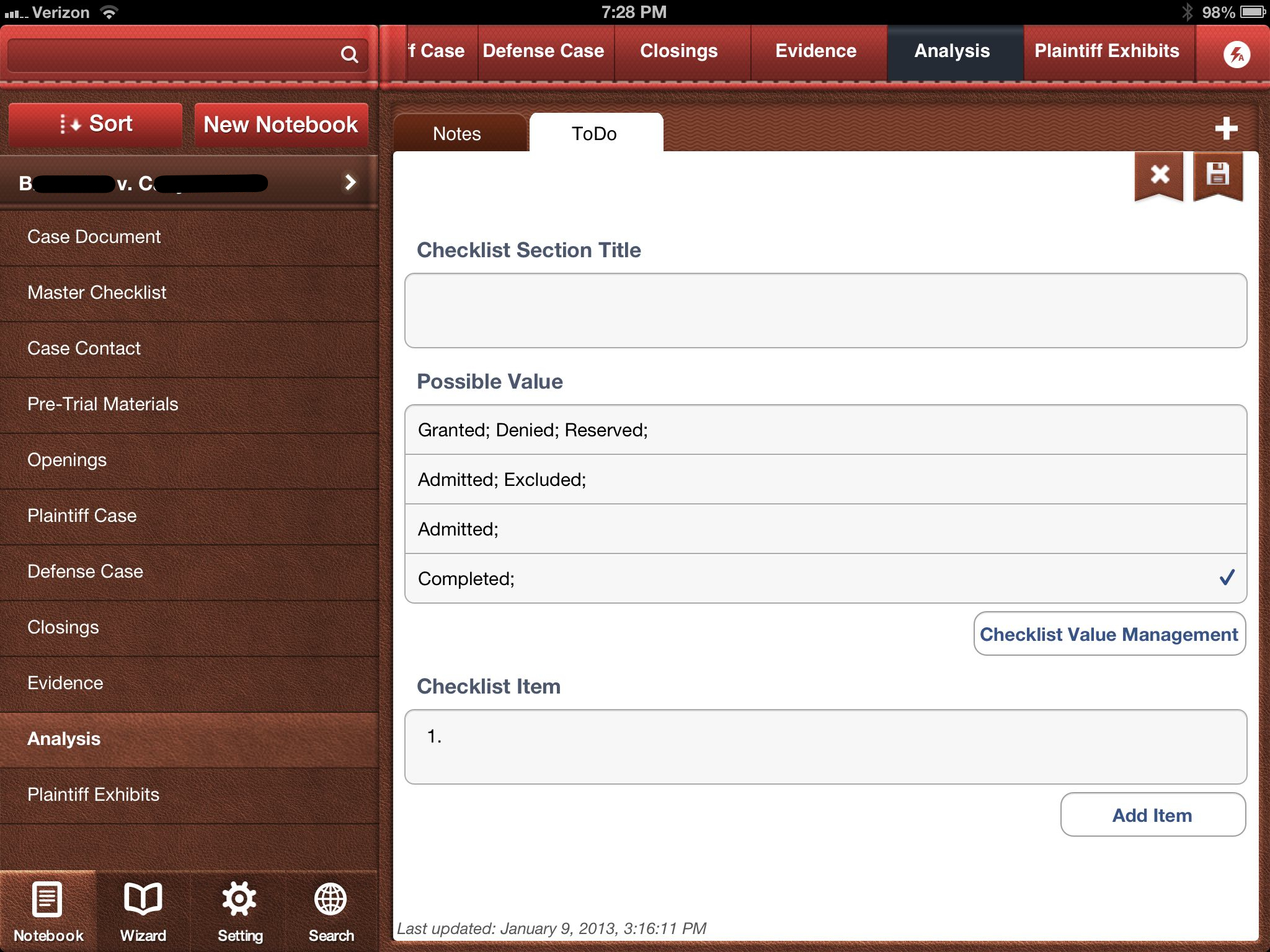
Trial Notebook currently allows Dropbox integration in a ‘download’ only mode with no two-way sync. Documents, including images, PDFs, and Word docs all download fine and are viewable in the app. In fact, Trial Notebook was extremely fast and stable while downloading an entire set of folders and subfolders on a complex litigation case that is just weeks shy of a jury trial, including a prior trip up the appellate court ladder. Many other apps have choked and crashed trying to download data this large from Dropbox. PDFs are not indexed even if they have been OCR’d, only text within the app shows up in searches. The app also includes the ability to track the admission of exhibits, i.e. documents are added from the main library to an ‘Evidence’ or ‘Exhibits’ page and they can be check-boxed (customizable). The developers plan to include two-way Dropbox sync as well as PDF annotation in a not-too-distant release. A premium pay-to-use service is also in the work. The service allows staff to collaborate and add items to a notebook via an online interface. Allowing staff to modify and add items through a web-based interface at the office and sync those directly down to the iPad is a good idea for attorneys on the go.
Perhaps the most interesting feature is the ability to pick an item from anywhere else in the notebook and drop it on the page you are currently viewing. So, in use, you could include a reference to an exhibit within a witness examination outline and the reference would also pull the checkboxes for admitted/denied. At that point in the examination, after moving admission, you could then check the appropriate box and the check would also be reflected on the main exhibit list page. Checklist items (for example for elements of proof) could be used in the same fashion. Additionally, tapping the hyperlink will jump you directly to the referenced item. Unfortunately, there is no plan to allow presentation of the exhibit via an AppleTV or VGA adapter cable. Also, beware: there is no ‘back’ button or recent item navigation so it may make it hard to find your way back to the examination outline in the middle of trial.
Text formatting on the outline pages is a bit odd, with icons that are pixelated and reminiscent of Word ’95. Additionally, there are many spots in the app that, from a user interface standpoint, are just plain silly. For example, when creating a New Checklist type page, you are presented with the option to save or discard the new page via an ‘X’ button or save via a ‘floppy disc’ icon…. Really. A floppy disc icon on an iPad.
Picking nits aside, the app really is a great concept and the developers are very responsive. As the app matures and further develops these 1.0 bumps will, no doubt, be resolved. If you don’t already have a system in place for an electronic trial notebook (such as Circus Ponies Notebook; OmniOutliner; PDF based or otherwise), TabLit’s Trial Notebook could provide you a useful starting point.