We Now Return to Our Regularly Scheduled Blog Posts… With a Bang.
Our firm tried three cases in the last five weeks. MacLitigator has been too busy over the past two or so months to post anything. The last case finished with a jury verdict coming in after 9:30 p.m. yesterday evening. But, news that TrialPad 2.0 was in the App Store made me pop open the iPad for a look.
The short review. Wow.
Summary: TrialPad 2.0 offers the best parts of a full blown laptop/desktop trial presentation system in a simple-to-use package at a fraction of the cost.
The Long Review
For anybody doing any amount of trial work, and yes that means even if you only have one trial, TrialPad is a must have application. TrialPad provides an amazing array of powerful presentation features in the small and unobtrusive package that is the iPad. Notably, MacLitigator was previously critical of the limited feature set and high price of $89. While $89 is still in the high end territory for the App Store/iOS ecosystem, the 2.0 version is easily justified.

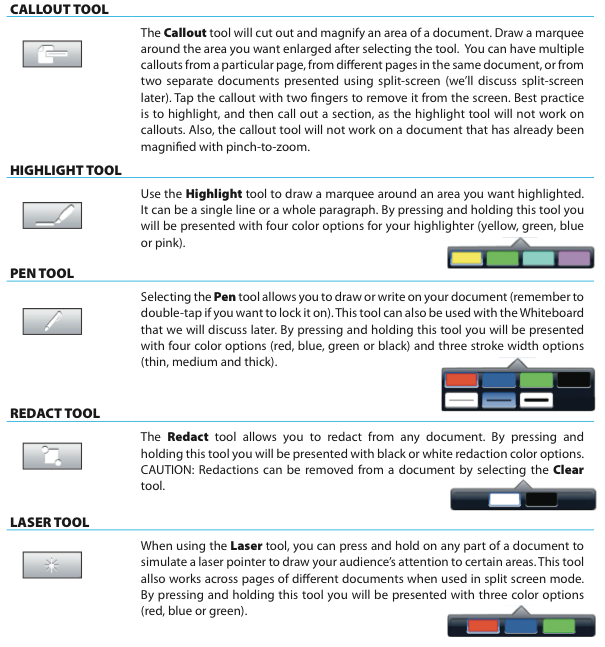
What can TrialPad do with a displayed document? It can: highlight or annotate with multiple colored pens; display a red, blue or green ‘laser point’ which follows your finger on the projected image; display two documents side by side; create on the fly call outs; zoom with the pinch and zoom ease of the iPad; redact on the fly; and, rotate an improperly displayed image or image set.
Finally, TrialPad can save a marked up image or document to be used and/or admitted as evidence. So, a witness can mark up a document and, hitting the ‘Fire’ button, will save a copy of the document/image to a special folder. The marked up version can then be used as needed later on with other witnesses or admission can be sought. TrialPad includes support for AirPrint which also means that a hardcopy could be printed right there in court if an AirPrint compatible printer is available.
TrialPad offers the ability to display on a projector or other screen any a huge number of file formats including everything from the ubiquitous PDF, to video files (and the ability to edit clips inside the app), to even Pages and Keynote plain .txt files (think raw court reporter transcripts). Of course, for best results, sticking with more common place file types, such as PDF, jpg etc., will work best for unaltered formatting when displayed.
The only thing missing at this point, and the killer feature that would take this app over the top of all other trial presentation software, is the ability to leverage Apple’s AirPlay so that the wires could be dumped. It really sucks dragging a VGA or HDMI cable around the podium or stringing it to counsel’s table. On a side note, TrialPad 1.5’s screen/display had a nasty habit of hanging when rapidly removing and replacing the video adapter, as in when you leave the podium and return to the table. At this point, the issue ‘seems’ to be cleared up in TrialPad 2.0.
If you’ve read this far…. thanks. Also, Lit Software and Ian provided me with an early demo license to TrialPad which included an update. MacLitigator feels obligated to ‘pass that license on’ and not keep it for personal use both for journalistic integrity and other reasons. So, keep an eye out here as there will soon be a give away to one lucky reader for a free TrialPad license. Also, the next few posts will detail ALL the tech used at trial, from hardware to ‘alternative’ trial presentation apps. Stay tuned.
July 10, 2011:Â Update Reader Stan Mortensen has highlighted some fairly serious bugs in TrialPad 2.0. I have not been able to replicate these bugs. As with any software or hardware, extensive testing and working with it prior to going into an actual trial is a must. You can see Stan’s video by following the YouTube link in the comments.
July 14, 2011:Â Update MacLitigator attempted to verify the identity of ‘Stan Mortensen.’ Despite repeated email requests, Mr. Mortensen did not provide a physical address or phone number or any other information which might verify his identity as being apart and separate from a competing product available on the iPad. Unfortunately, at least some of his bug reporting is accurate.