Archive for the ‘hardware’ Category

iPad at Trial

Saturday, April 24th, 2010

Maclitigator just completed a four day jury trial (a.k.a. “in the Soup” as my friend Chuck might say) using the iPad as the primary means of getting information in front of the jury.  Here’s the low down on how it went.

iPad for Trial Presentation

The last post on the iPad indicated that it isn’t (yet) of too much use in the day to day affairs of a trial attorney.  However, at trial, the iPad really shines. Trial technology should be transparent. This means that it should not appear to the jury as (1) overly flashy; or, (2) a complete headache and a distraction to the attorney. Apple has created a product which facilitates presentation of evidence without getting in the way and does so in a completely unassuming fashion.

The iPad sits low and is the perfect size to place next to a legal pad or other notes while at the podium. Using Keynote, all documents to be admitted at trial were loaded in. BlankiPad_Trialslides provided a ‘tabbed’ divider set up, separating photos of the scene, x-rays, medical records, tables & summaries into their respective categories. Once the “Trial Slides” were completed, examination outlines cross referenced the appropriate slide. The slides were not ‘motion slides’ or slide incorporating transitions or other fancy Keynote stuff. Just a single page per picture/document. Photos were grouped as a single exhibit (e.g. Exhibit 5 was a series of 5 photos, or 5 slides in Keynote).  The slides were then printed out and placed in an indexed binder which referenced the Exhibit number, the slide number, and the tab within the three ring binder. In this fashion, slides could be pulled up quickly and all evidence to be admitted was contained in a single Keynote presentation.

All deposition transcripts were transferred to Keynote as separate presentations, using PDFtoKeynote, a great little application that will take a multi-page PDF and turn it into a Keynote presentation, one page per slide.  Because the iPad can switch so quickly between presentations, flipping from the Trial Slides to the deposition transcript slides during a cross examination is an effortless process. Jumping back and forth between evidentiary exhibits and impeachment transcript evidence works like a charm and is much more smooth than wandering around the courtroom looking for the paper documents. PDFtoKeynote also works great for moving over multipage medical records too.

One caveat about using Keynote. If you develop your slides on a iMac or MacBook, be aware that (1) presenter notes do not transfer; (2) some fonts/transitions/image groups do not make the cut and will be replaced or removed. There is an Apple support article detailing these issues, but realistically your slides should be single page evidentiary focused, not slick “hey look at me stuff.”

Hardware Setup

Hardware setup could not be simpler.

(1) a good high lumen projector (>2500 lumens);

(2) a high quality and long VGA cable. Don’t try your local Shack or Bust Buy, they’ll either sell you an overpriced “Monster” cable or tell you that you can’t run long VGA cables because the signal fails. We ran a 25′ thin VGA cable from the projector to the podium with no loss of signal and at a cost of about $25. Our cable came from VPI and was good quality.

(3) an iPad, of course;

(4) a VGA video adapter cable for the iPad;

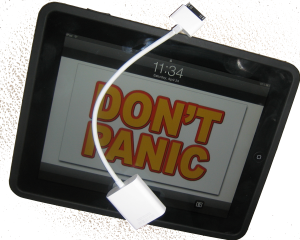
(5) the silicon inCase for iPad (get the black one, obviously). The iPad itself is a bit slippery. Sweaty palms and all during trial, the inCase silicon provided a great grippy feel and prevented the hard ‘bang’ sound of aluminum on wood at the podium. One downside of the case is that the iPad VGA video adapter would not fit through the opening. This required pulling the case slightly down to plug in the video.

Only twice did a technology hiccup occur during use at trial. On opening a presentation for the first time, Keynote abruptly quit, resulting and returned to the iPad home screen. Tapping Keynote and reopening the presentation quickly cured the problem. It’s a weird little bug that will probably be remedied and can be avoided by opening the presentation in advance. But, even with the ‘crash’ of Keynote, two taps and the thing was back up and FAST. The first time it happened there’s that momentary panic, but it opened up so quickly that the second time it happened I didn’t even notice it.

The MacBook came along at trial, but sat somewhat despondent at counsel’s table. Never once was it taken to the podium. It did come in handy for a quick search, during opposing counsel’s direct exam, for cross exam references in the witness’s deposition. But, iPad then took over by pulling up the transcript for the jury to see. More about the trial itself can be read here.

iPaid for iPad

Wednesday, April 7th, 2010

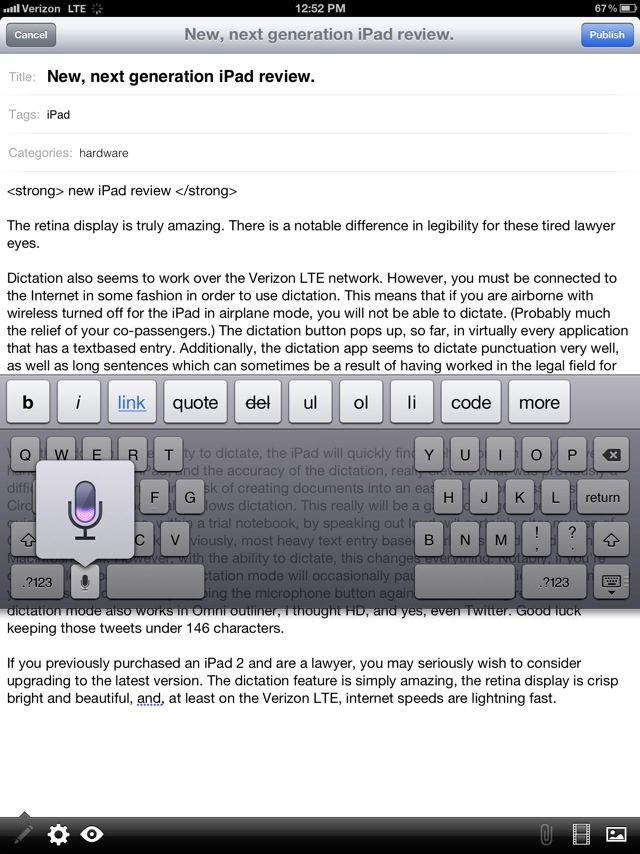
Putting the iPad through its paces, this post was drafted using Dragon Dictation on the iPad.  What follows, within quotes, was completely drafted and edited on the iPad.

“We keep hearing about the iPad’s “magical” experience. However, the only magical thing about the new iPad is the ability to make people pull money out of their pocket and simultaneously make them blind to the shortcomings of the device which they receive in exchange for that cold hard cash. Getting any real work done on the iPad is next to impossible. The keyboard itself makes typing documents more than difficult. But, add to that fact a complete inability to move documents easily back and forth between the desktop and the iPad a practice in frustration.

So, here is a complete review of the iPad as relevant to attorneys.

What it’s good for right now.

Right now. There are some amazing things that the iPad can do. Following is a list of applications which are necessary for attorneys.

Dragon dictate. This little application is quite amazing on the iPad. It enables you to dictate at an accuracy and ease much much greater then Macspeech/Dictate.

Nuance’s Dragon Dictate represents everything that should happen with a dictation program. I don’t need to train it, I don’t need to alter words in its dictionary, I don’t need to pay outrageous sums for special legal dictionaries. Granted using Nuance to dictate something like 790 3P third 1004 (Utah 2007) can be a bit frustrating.

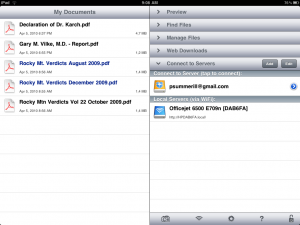
GoodReader: this application allows you to “mount” an server for remote file storage such as Dropbox or local network hard drive.  Only by doing this can you readily and easily access files which are not available on the iPad. Good reader also allows youIMG_0005 to read Adobe PDFs in an easy way which restructures the text flow so that you are not scrolling all over the screen and also incorporates the ability to cut and paste text, albeit an entire page at a time.

iWork/Keynote: Keynote is going to be an application which gets used at trial very easily. Loading slides in and then scrolling to them during trial will be very easy. You can transfer keynote slideshows from your Mac to iTunes which are then transferred over to the iPad. Or, you can create slideshows directly on the iPad itself. Assuming that you have loaded all necessary images into the photo browser.

What it’s not so good for:

Right now the iWork applications simply have no usable means of transferring documents back and forth between an iPad and a desktop machine. There is no built-in file management system for the iPad. Additionally, many of the advanced features in keynote and numbers will be lost on transferring over to the iPad.

Bottom line: wait to buy the iPad. There is no specific “need” for attorneys to have this device at this time. While the future of the iPad may hold magical and amazing things in store for attorneys, the inability to do any significant work and the complete lack of applications which support the workflow of an attorney

What to look for down the line: There needs to be a more robust and easy-to-use method of transferring files back and forth between a full desktop computer and the iPad itself. Additionally, there needs to be a more legal specific applications. OmniGroup is going to crank out OmniOutliner for the iPad as well as OmniFocus.  Both of these will be welcome additions.

Additionally, if Circus Ponies were to create an iPad version of their Notebook software this would be an amazing addition to the iPad which would make it infinitely more usable for attorneys. Specifically, either OmniOutliner or Circus Ponies Notebook would make taking depositions with the iPad very very easy and enjoyable, to the extent that a deposition can be enjoyable. In effect, no more playing the who sunk my battleship while asking questions over the top of the laptop screen thrown up as a barrier between you and the deponent. Similarly, either of these applications, if they supported an external monitor/projector hookup, would greatly increase the efficiency with which direct and cross examinations could be conducted at trial while simultaneously displaying the exhibit, document, or other evidence directly on screen for the jury and judge to observe.

Finally, look for Apple to create a feasible file transfer solution. The current method of transferring files back and forth is a complete mess. Requiring users to transfer files via iTunes is simply unworkable as it not only makes things unnecessarily complicated, but the net result is two different versions of a single file.

Sent from my iPad”

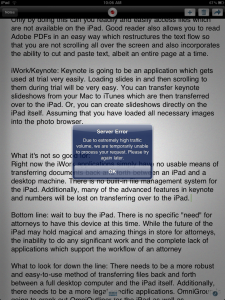
A few notes: Cut and paste from Dragon Dictation into WordPress did not work. Additionally, the screenshots, although taken directly on the iPad, were also uploadedDragon Dictate Error via a MacBook. Finally, Dragon Dictate has some kind of word limit to what it can handle (see screen shot). After dictating for a while, the app gives an error message that the server is busy, but if a new dictation note is started, it works just fine.

iPad or not to Pad

Saturday, January 30th, 2010

Hype, criticism and speculation.

The iPad, Apple’s much awaited tablet platform, currently draws almost as much speculation as it did before it received a formal announcement. The hype, criticism and speculation didn’t end with the announcement. Criticisms run the gambit and, some are properly laid. A few key things might, however, make this a very useful tool for the trial attorney.

iWork Keynote will be a huge boon to conducting presentations in Court. If the video out will allow dual display the same as Macbooks, i.e. you can view a ‘presenter’ display while using the projector for the slide, it’s almost a no brainer for court room presentations.

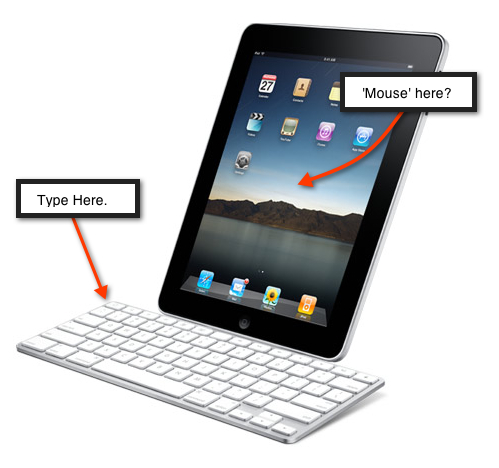
Also, if the iPad can multi-task, this would make the remainder of the iWork suite worth exploring on the tablet platform, although questions remain the ergonomics of typing and mousing about with a cursor. Since it is a touch interface, does the user move their hand from thetypevsmouse keyboard to the screen to change the cursor location? If so, and given the awkward angle shown with the keyboard attached, it doesn’t seem like a very functional workflow.

OmniGroup, makers of OmniFocus and OmniOutliner, two of the most frequently used pieces of software by Maclitigator, announced plans to port their entire suite of applications to the iPad.  This, also, is a huge boon. OmniOutliner is a really great application for deposition outlines, including the ability to Quicklook attachments from within the outline itself. Maclitigator long ago lamented the ‘Battleship’ atmosphere a laptop creates between a deponent and the examining attorney… it’s already hard enough to conduct a meaningful deposition in the adversarial process without also erecting a physical barrier between yourself and the witness. So, taking a deposition with a tablet is finally a reality with the iPad. But, as above, this raises the question of what file system and syncing capabilities the iPad will allow. Even with the best of preparation it always seems inevitable that you dig through the file on your laptop looking for a reference mid-deposition.

Finally, Frasier Speirs column over at Macworld makes the best argument for iPad as a device which will succeed, both among professionals and neophytes. He points out that the iPad, with its simple interface and elimination of the typical ‘techie’ problems will solve the bane of all computers …

… the infantilizing effect of high technology on adults. From being in control of their world, they’re thrust back to a childish, medieval world in which gremlins appear to torment them and disappear at will and against which magic, spells, and the local witch doctor are their only refuges…..

That article sums up why the iPad confuses (and frightens0 so many ‘techie’ types… it will make technology usable, accessible and meaningful without needing to ‘think’ about using it. As soon as Dragon/Nuance port a full blown dictation system to the iPad, it may be close to over for the laptop as we have known it.

End of a Love AffAir.

Monday, December 1st, 2008

I am writing to tell you that this relationship just isn’t working out for me, even though we’ve been together almost one year. I need to be happy and I’m just not happy anymore. When it all started, the sparks and super sexy attitude filled my eyes so much that I could not accept that you just did not complete me. And, I must confess, I have been seeing someone else. Yes, they are a little thicker around the middle, but they really fulfill all my needs. Plus, no offense, you’re smart, skinny super thin sexy, but you just lack the processing power I sometimes desire. Also, you are a little uptight, not enough ports and slots.  And don’t get me started on the way you hide your battery and memory.  I can see why you hide the memory part, it being so small and all.  But your battery too? Finally, that hard drive…. so shallow and slow and scant on space. A bulimic supermodel, always a binge and purge of information and data just so you could fit into that thin aluminum shell.  I know you’ll find someone who truly loves you for what you are, a white hot, super thin model of aesthetic perfection. They might even tolerate your diva like demands of a high price for low output. But me, I’m moving on. The new MacBook has all I need, even if a little bit heavier, I can live with the weight gain. So, goodbye Air, we’ll always have the memories.

If you wanna be happy for the rest of your life, never make a laptop a paper thin slice. Take my advice and here’s what you do, get a fatter laptop to carry round with you.

A Gripe and A Fix.

Thursday, August 14th, 2008

Part of the Apple experience comes from aesthetics. The hardware to the software all look so good and make interfacing with a computer a more human experience, less geeky and, I believe, makes work more enjoyable… of course a stable OS goes a long way too.

But, Apple (and many other manufacturers) miss the boat by not including a ‘Pointing Stick’ style mouse in their laptops. Years of use with IBM laptops (now Lenovo) convinced me the convenience of a Trackpoint or Pointing Stick on the keyboard outweighed the ugly. Moreover, after adapting to Apple’s trackpad only configuration, I have wrist pain in my right wrist from mousing. Switching to a lefty mouser helps, but probably only forestalls the inevitable, pain developing in the left wrist.

Although not a full-time solution, there are available desktop USB keyboards with built-in Pointing Sticks which a Macbook will recognize, so that while at a desk, an alternative and wrist relieving option exists.

Lenovo sells a full-size Ultra-Nav USB Keyboard that has both a Trackpoint and Trackpad option built in. Because it has a Windows key (shudder), you still get your command key for the Mac. The keyboard also has additional USB ports so your not going to lose a USB port by plugging it in. It costs a measly $99 and, as an added benefit, you get that beautiful IBM snap on the keyboard, a huge benefit for any touch typist. If you really want to kick it old school, PCkeyboard.com sells an old style IBM keyboard, the Endurapro, that actually uses springs underneath the keys. This is that old-school clickety-clackety sounding keyboard, but those springs and the tactile feedback are much missed by many typing pros, authors, writers and geeks. The Endurapro does not, however, have additional USB ports but does have that ugly retro welcome to 1991 feel that you just can’t find anywhere else. It retails for $99 as well.

Stevenote – The Two Best Announcements

Monday, June 9th, 2008

For those of you who don’t know yet, Steve Jobs gave the keynote at WWDC today. The two best announcements are (1) a new 3G iPhone, built in GPS and excellent price ($299 16gig); and, (2) push services for calendar, email, pretty much everything (a.k.a. lookout Exchange and RIM). The upgrades for push services require a $99 per year Mobile Me subscription which includes 20 Gigabyte (?!?!) of storage. Mobile Me replaces .Mac and, hopefully, results in services that are not painfully slow (iDisk is pretty useless IMHO). In the meantime, .Mac is down probably due to the changeover or, just because it’s still .Mac and still sucks.

While waiting for .Mac Back to My Mac to come back up, you can watch the new 3G iPhone commercial here.

MacBook Air On the Road; ModBook Gets Probed

Monday, March 31st, 2008

Traveling this week with the MacBook Air. A few things of note: air2.jpg

  1. On a five hour flight from Las Vegas to Anchorage, the battery was still chugging along at 25% (wi-fi disabled) when the flight attendant told me to put it away because we were landing.
  2. Some early reports suggested that a high-speed USB internet adapter would not fit in the Air’s unique flip down USB port. However, the Sierra Wireless AirCard 595U slides in no problem.

    aircard.jpg

  3. Some shock and dismay when attempting to lock the Air down with a Kensington cable as the Air has no Kensington lock receptacle!
  4. On the plus side: the Air actually fits inside my hotel’s in-room safe (unlike the 15″ MacBook Pro replaced by the Air).

In other news: PC Mag reviewed the ModBook and gave it a paltry 3 out of 5 recommendation. For a rig that costs $2,600+ it really should do much better than 3 out of 5. PC Mag found the ModBook fell short by having terrible handwriting recognition, no rotation of the display (you are stuck with portrait mode); including a GPS antenna instead of WWAN (yeah, that’s just bone headed); lack of keyboard; and, heavy for a slate (5+ versus Motion Tablet’s 3.3 pounds). So, guess that makes the Air the better choice at this point even though it has neither built-in WWAN or GPS. 

iPhone SDK Announced, Alphabet Soup Down 3 Letters

Thursday, March 6th, 2008

Today Apple (formally) announced the release of a Software Development Kit.  An SDK allows independent third party developers to create applications for the iPhone.  Applications will be distributed through iTunes and subject to Apple approval (Good: no crap malware sneaks through. Bad: you must Trust Apple’s discretion in allowing/disallowing applications onto iTunes).  In any case, this comes as really good news for me, someone too timid to jailbreak/hack their iPhone into third-party software submission. Also, for you Enterprise drones in the big firm or corporate world, Apple licensed ActiveSync to wash away all of your Microsoft Exchange woes and ease the minds of IT Staff everywhere.  Oh, yeah, and ActiveSync will allow push email, calendar and address book syncing… a.k.a. watch out Palm & RIM.  You can get all the gory details at either tuaw or Lifehacker.

MacBook Air – The Litigator’s Review

Saturday, February 16th, 2008

air 

So, I bought in. But, it’s no shocker. Prior to switching, and a LONG time ago, I ran a desktop computer and an IBM X20. Why? Power at home, utility on the road. The X20 fit perfectly for long sessions doing document research & review, went through depositions, hearings and meetings with a breeze. The desktop provided screen real estate, more power, a dedicated DSL connection and loads of hard drive space. The more things change, the more they stay the same.Evolution, not revolution.Many fault the Air not because of what it is, but because of what it isn’t… revolutionary. The Air fits a niche, but doesn’t redefine a product line like the iPhone, or practically invent a market, like the iPod.So, present day, I run a MacBook Pro 17″ for screen real estate, power, hard drive capacity, lots of i/o paths (firewire, usb 2.0, dvi etc.) and the Air goes to depositions, meetings, hearings and, of course, the couch… because it’s just that light and I’d rather surf tech reviews and news or summarize depositions than devote my full attention to another mindless professional sport.No, the Air is not for everyone. For professional hardcore computer users, it’s a second laptop. For students (with enough capital backing), or everyday users who travel alot and like to carry their computer along, it’s a first and only computer. If you really want to edit video in Final Cut Pro and massage images in Aperture, get MacBook Pro.

battle 

D4… You Sunk My Battleship!

At some point, Microsoft began pushing the Tablet PC format. Any professional (attorney, accountant, psychologist, investigator, auditor, physician) should be in love with the tablet form factor. Setting a laptop between yourself and a deponent (or anywhere on the table for that matter) instantaneously creates a perceived barrier to communication. You know how you feel when you are at some bureaucrat’s counter and they look at the screen you cannot see? Laptops accomplish the same thing for interviews of any kind. The tablet form factor eliminates the “You Sunk My Battleship!” feeling from any interview or deposition.Also, walking to a podium carrying a tablet seems much more natural than walking to the podium carrying an open laptop… Sorta like carrying a large notepad. And, of course, typing notes while speaking with a judge fails miserably when compared with jotting notes on the flat screen of a tablet. In short, I miss my tablet.

Air Everywhere.

So, back to the Air. It doesn’t eliminate any of these issues, but does mitigate some of them. The Air’s light and thin characteristics make it much less obtrusive and more natural to carry around a courtroom. But, that screen still sits at a 90 degree angle, raising the barrier between you and your audience, deponent or interviewee.Battery life, though advertised at 5+ hours has been coming in around 3.5-4.5 depending on usage. Of some note, however, is that the battery takes much longer to charge than your typical MacBook. Typical battery life on my prior slates/convertible tablet PeeCees averaged from a low of 1.5 (?!?!?) to a high of 2.5. So though not making the grade on advertised battery life, the Air lasts a lot longer than my PeeCee tablet setups. Also, the Air’s harddrive capacity and processing power actually exceed most of my prior tablet setups. This means I can carry more information and have it accessible for a greater length of time than previously. Finally, and without a doubt, the Air trounces prior set ups, whether tablet or ultraportable PeeCee, in processing speed, memory and display. So, while not perfect, it fits for now.

A Word on ModBook.

No doubt some of you are wondering why not just buy a ModBook? Well, because I could put my hands on an Air at the Mac store local. I have no idea how well Axiotron integrated Spaces & Expose, features of OS X I cannot live without (especially on a smaller screen). Also, I still need a keyboard and a pure slate simply won’t cut it… In fact, I previously moved away from a Motion Tablet M1600 because it was a slate and switched to an IBM X60t simply to keep the keyboard without having to carry extra junk. Finally, Back-to-My-Mac will play an integral part in trial presentation (more on that in a later post) and I need to know for certain that the ModBook will play nice with screen sharing. Right now, I cannot test any of these things out and because Axiotron is a third-party vendor, no guarantees exist that any of these features will work the way I need.

Pros & Cons

Pro- Light; goes anywhere; super bright and fast screen (almost feels like an instant-on computer); small form fact makes it less obtrusive.

Con- Still a laptop; battery life not as advertised; a little bit expensive.This review, of course, focused on the litigator perspective for the MacBook Air. If you want a ‘spec’ breakdown, I suggest: TUAW’s review.