Part of the Apple experience comes from aesthetics. The hardware to the software all look so good and make interfacing with a computer a more human experience, less geeky and, I believe, makes work more enjoyable… of course a stable OS goes a long way too.
But, Apple (and many other manufacturers) miss the boat by not including a ‘Pointing Stick’ style mouse in their laptops. Years of use with IBM laptops (now Lenovo) convinced me the convenience of a Trackpoint or Pointing Stick on the keyboard outweighed the ugly. Moreover, after adapting to Apple’s trackpad only configuration, I have wrist pain in my right wrist from mousing. Switching to a lefty mouser helps, but probably only forestalls the inevitable, pain developing in the left wrist.
Although not a full-time solution, there are available desktop USB keyboards with built-in Pointing Sticks which a Macbook will recognize, so that while at a desk, an alternative and wrist relieving option exists.
Lenovo sells a full-size Ultra-Nav USB Keyboard that has both a Trackpoint and Trackpad option built in. Because it has a Windows key (shudder), you still get your command key for the Mac. The keyboard also has additional USB ports so your not going to lose a USB port by plugging it in. It costs a measly $99 and, as an added benefit, you get that beautiful IBM snap on the keyboard, a huge benefit for any touch typist. If you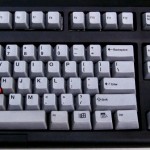 really want to kick it old school, PCkeyboard.com sells an old style IBM keyboard, the Endurapro, that actually uses springs underneath the keys. This is that old-school clickety-clackety sounding keyboard, but those springs and the tactile feedback are much missed by many typing pros, authors, writers and geeks. The Endurapro does not, however, have additional USB ports but does have that ugly retro welcome to 1991 feel that you just can’t find anywhere else. It retails for $99 as well.
 popped up… an “Action” item. Sort of like Command-Click or Right-Click on a regular Mac. I can only assume this is a future Command-Click interface that was somehow inadvertently triggered, or in non-lawyer speak, a bug. Unable to reproduce on a different web page (expedia.com), so don’t know quite what that means. But a Command-Click on the iPhone would be much welcomed for cut-n-paste and other applications!


