Leopard Slickness.

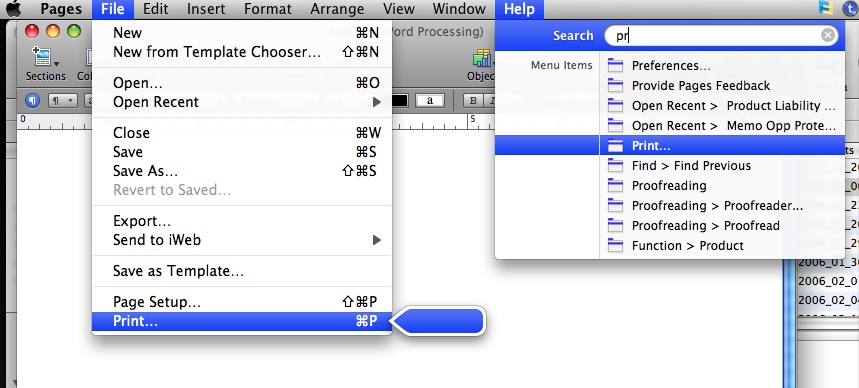
In addition to Vista hate, Mac OS X Leopard’s new ‘help menu highlight’ feature makes switching so much more enticing for shortcut hounds. Where Tiger often left switchers poking around in menus, hunting for that quick way to print, switch tabs, or whatever menu item, Leopard gets there quickly and efficiently. In any Leopard ready application, to find that obscure menu item quickly and easily, hold down shift, command (the ‘squiggle’ next to the space bar) and the “?” key at the same time to access the ‘help’ menu. Now, type the first few letters of that menu item, for example ‘print,’ then cursor down for mouse free access to that menu item.

menu4.jpg


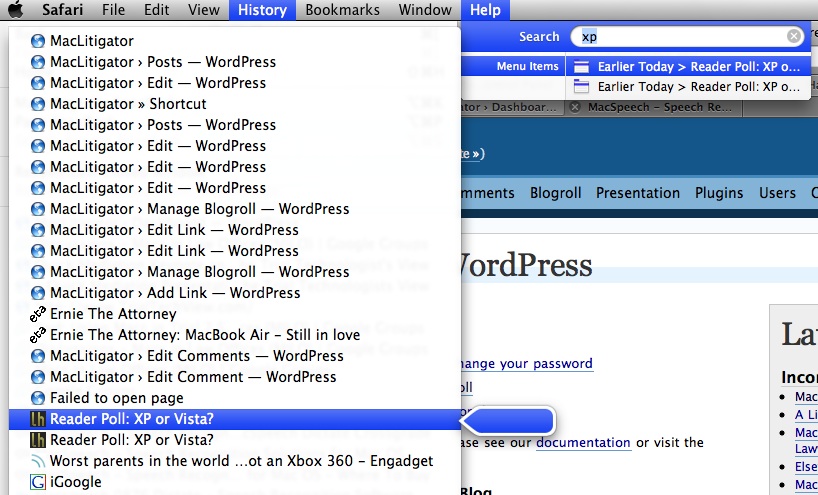
The really cool part is that you can access not only ‘standard’ menu items such as print, but also ‘recent’ documents items and ‘history’ items in Safari.


Safari History

OK, This One Is Mine.

Unless you are in trial ALOT (in which case you probably aren’t reading this), you may want a way to stay fresh on your evidence (objections, hearsay etc.). Or, maybe you just want to expand your Spanish vocabulary or brush up on those periodic tables… who knows. But, just as in school, one way to keep fresh can be to flip through a set of flash cards from time to time.

But, who can stand to carry several decks of flash cards around? Well, if you have an iPhone, you can stand it, and listen to some smooth tunes while you learn as well.

Evidence Flash Card AnswerEvidence Flash Card Q

Step 1: Either scan a set of flash cards (Fujitsu Scansnap or any business card scanner should do) or create a set in Pages/Word (if creating a custom set, be sure to set the paper size to no larger than 3X5 and landscape mode, not portrait).

Step 2: Email those suckers to any account which your iPhone uses.

Step 3: Open email on your iPhone, download the document, turn that iPhone sideways, and enjoy.

No more dropping, losing, or inadvertently shuffling up your flash cards. Plus, they all now fit in the slim slim iPhone.

One caveat… if you are using Adobe Acrobat Pro, you might want to avoid OCR’ing the document and/or saving it out under Preview. Some OCR’d flash cards refused to display properly on the iPhone, but once stripped of their text and saved from Preview worked just fine.

I can’t dream up every great tip….

and in fact seem to be more of a collector than an inventor. But I sure know a good tip when I see it. If you have an iPhone, you can create a work around to make your phone vibrate first, then ring second according to this tip from jkOnTheRun:

Customize a ringtone by adding a period of silence before the actual sound. Then load up up the custom ringtone on your iPhone. Now, make sure you set your iPhone to use the new ringtone and also to vibrate upon an incoming call. When you get dialed up, your iPhone should “play” the silenced part of your ringtone while vibrating.

via: Lifehacker

Switch Hitter Help

Moving from Windows to OS X? The Unofficial Apple Website points out OSXhelp “Insanely Simple tutorials for the first time Macintosh user.” According to TUAW, the site should be of great help in explaining all those little things experienced users take for granted. A visit to the site confirms that it shows some promise, including this handy primer on keyboard shortcuts…. A topic always of interest to myself.

Other sites that help grease the switch: winapple

macmigrant

Apple’s own official Findouthow

and the cleverly titled mackindergarten.

Reformatting Text

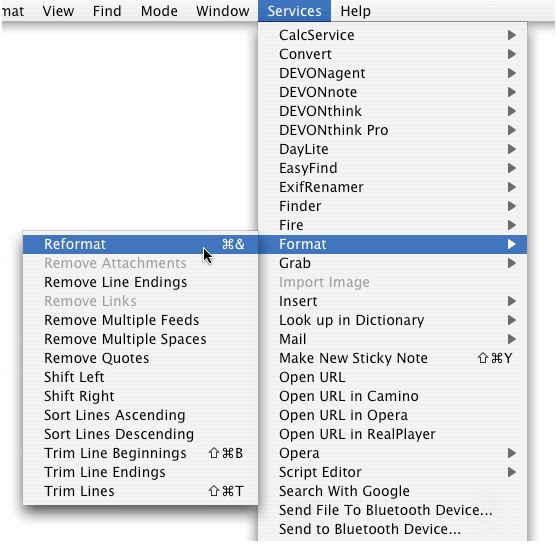
Every litigator (who does at least some of his or her own typing) should know the basics for copy and paste… “shift/alt/command v” to paste and match style vs. plain old “command v.” (FYI the ‘command’ key is the squiggle next to the space bar).But, even the paste special sometimes leaves you hanging, literally, with a whole bunch of bogus line endings, all caps, mixed caps or some other horrid text abomination. Devon Technologies did everyone a favor by putting together an OS X service which reformats text in a snap… WordService 2.7 is a free ‘service’ plug-in that takes away some pain.Devon’s WordServiceWordService CapsOf course, to make your favorite WordService quickly available without too much mousing around, you should map a keyboard shortcut to it in System Preferences>Keyboard & Mouse>Keyboard Shortcuts. So, really it’s a two-fer’ tip here… because you can map any menu item you want to a particular keyboard shortcut, not just services items.Sys Preferences Keyboard Mapping

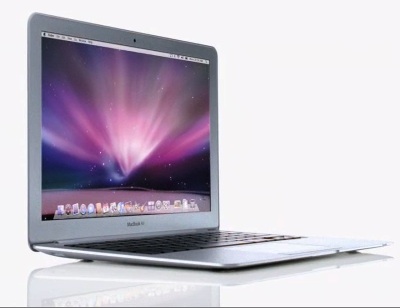
MacBook Air – The Litigator’s Review

air 

So, I bought in. But, it’s no shocker. Prior to switching, and a LONG time ago, I ran a desktop computer and an IBM X20. Why? Power at home, utility on the road. The X20 fit perfectly for long sessions doing document research & review, went through depositions, hearings and meetings with a breeze. The desktop provided screen real estate, more power, a dedicated DSL connection and loads of hard drive space. The more things change, the more they stay the same.Evolution, not revolution.Many fault the Air not because of what it is, but because of what it isn’t… revolutionary. The Air fits a niche, but doesn’t redefine a product line like the iPhone, or practically invent a market, like the iPod.So, present day, I run a MacBook Pro 17″ for screen real estate, power, hard drive capacity, lots of i/o paths (firewire, usb 2.0, dvi etc.) and the Air goes to depositions, meetings, hearings and, of course, the couch… because it’s just that light and I’d rather surf tech reviews and news or summarize depositions than devote my full attention to another mindless professional sport.No, the Air is not for everyone. For professional hardcore computer users, it’s a second laptop. For students (with enough capital backing), or everyday users who travel alot and like to carry their computer along, it’s a first and only computer. If you really want to edit video in Final Cut Pro and massage images in Aperture, get MacBook Pro.

battle 

D4… You Sunk My Battleship!

At some point, Microsoft began pushing the Tablet PC format. Any professional (attorney, accountant, psychologist, investigator, auditor, physician) should be in love with the tablet form factor. Setting a laptop between yourself and a deponent (or anywhere on the table for that matter) instantaneously creates a perceived barrier to communication. You know how you feel when you are at some bureaucrat’s counter and they look at the screen you cannot see? Laptops accomplish the same thing for interviews of any kind. The tablet form factor eliminates the “You Sunk My Battleship!” feeling from any interview or deposition.Also, walking to a podium carrying a tablet seems much more natural than walking to the podium carrying an open laptop… Sorta like carrying a large notepad. And, of course, typing notes while speaking with a judge fails miserably when compared with jotting notes on the flat screen of a tablet. In short, I miss my tablet.

Air Everywhere.

So, back to the Air. It doesn’t eliminate any of these issues, but does mitigate some of them. The Air’s light and thin characteristics make it much less obtrusive and more natural to carry around a courtroom. But, that screen still sits at a 90 degree angle, raising the barrier between you and your audience, deponent or interviewee.Battery life, though advertised at 5+ hours has been coming in around 3.5-4.5 depending on usage. Of some note, however, is that the battery takes much longer to charge than your typical MacBook. Typical battery life on my prior slates/convertible tablet PeeCees averaged from a low of 1.5 (?!?!?) to a high of 2.5. So though not making the grade on advertised battery life, the Air lasts a lot longer than my PeeCee tablet setups. Also, the Air’s harddrive capacity and processing power actually exceed most of my prior tablet setups. This means I can carry more information and have it accessible for a greater length of time than previously. Finally, and without a doubt, the Air trounces prior set ups, whether tablet or ultraportable PeeCee, in processing speed, memory and display. So, while not perfect, it fits for now.

A Word on ModBook.

No doubt some of you are wondering why not just buy a ModBook? Well, because I could put my hands on an Air at the Mac store local. I have no idea how well Axiotron integrated Spaces & Expose, features of OS X I cannot live without (especially on a smaller screen). Also, I still need a keyboard and a pure slate simply won’t cut it… In fact, I previously moved away from a Motion Tablet M1600 because it was a slate and switched to an IBM X60t simply to keep the keyboard without having to carry extra junk. Finally, Back-to-My-Mac will play an integral part in trial presentation (more on that in a later post) and I need to know for certain that the ModBook will play nice with screen sharing. Right now, I cannot test any of these things out and because Axiotron is a third-party vendor, no guarantees exist that any of these features will work the way I need.

Pros & Cons

Pro- Light; goes anywhere; super bright and fast screen (almost feels like an instant-on computer); small form fact makes it less obtrusive.

Con- Still a laptop; battery life not as advertised; a little bit expensive.This review, of course, focused on the litigator perspective for the MacBook Air. If you want a ‘spec’ breakdown, I suggest: TUAW’s review.

And the first hint is…

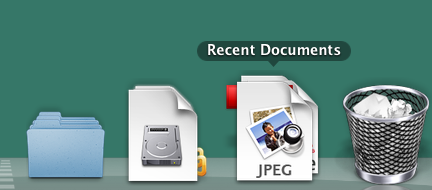
Add a recent documents stack item to your dock for quick access to all your recent documents.Recent Docs StackOpen Terminal and type: defaults write com.apple.dock persistent-others -array-add '{ "tile-data" = { "list-type" = 1; }; "tile-type" = "recents-tile"; }'After that, type: killall Dock in terminal to restart the dock.Finally, control click on the new folder and choose “Recent Documents.”You can set the number of documents remembered in System Preferences, Appearance.via: macosxhints.com

First Time

Hello. I needed a place to dump all my tips, hints, thoughts and projects for using Macs in litigation. So, this blog will be the place to stash and store all those items. A bit about me. I am Peter Summerill, I have been practicing law for 10 years now. My practice focuses on representing injury victims, keeping insurance companies honest and protecting individual rights. I and my partner go to trial with some frequency and I previously relied on Windows/Microsoft at trial. I switched to Mac about a year ago and … struggled at first to find a way to make Mac work. Moving from Microsoft to Mac has been both a struggle and a breeze. MacLitigator will serve as a reference for attorneys, lawyers and litigators (including myself) who want to use Macs in their practice.